
The short version
When paid access ends, the workspace becomes read-only for 30 days. Everyone in it can still view and export. Then its contacts, notes, card photos, research and company context are deleted. The free trial is different: it has no export window, so trial contacts are deleted the moment the 30 days are up.
Plan by plan
| Plan | Full access | Then | Deleted |
|---|---|---|---|
| Free trial | 30 days from your first sign-in | Nothing: no export window | When the trial ends |
| Solo or Business, cancelled | To the end of the period you paid for | 30 days Export only | When the 30 days end |
| Team Pass | 12 months, plus 12 for each renewal | 30 days Export only. Renewing in that time reactivates it | When the 30 days end |
| Renewal payment failed | Ends with the last paid period | Export only straight away while Link retries the card | 30 days after the last paid period, if the payment never goes through |
Each workspace runs on its own. A Team Pass or Business on a company workspace does not keep the contacts in your personal space, and the other way round.
The Export only period
The workspace shows Export only, and a banner says Read-only until the date, then Export your collections or choose a plan to continue.
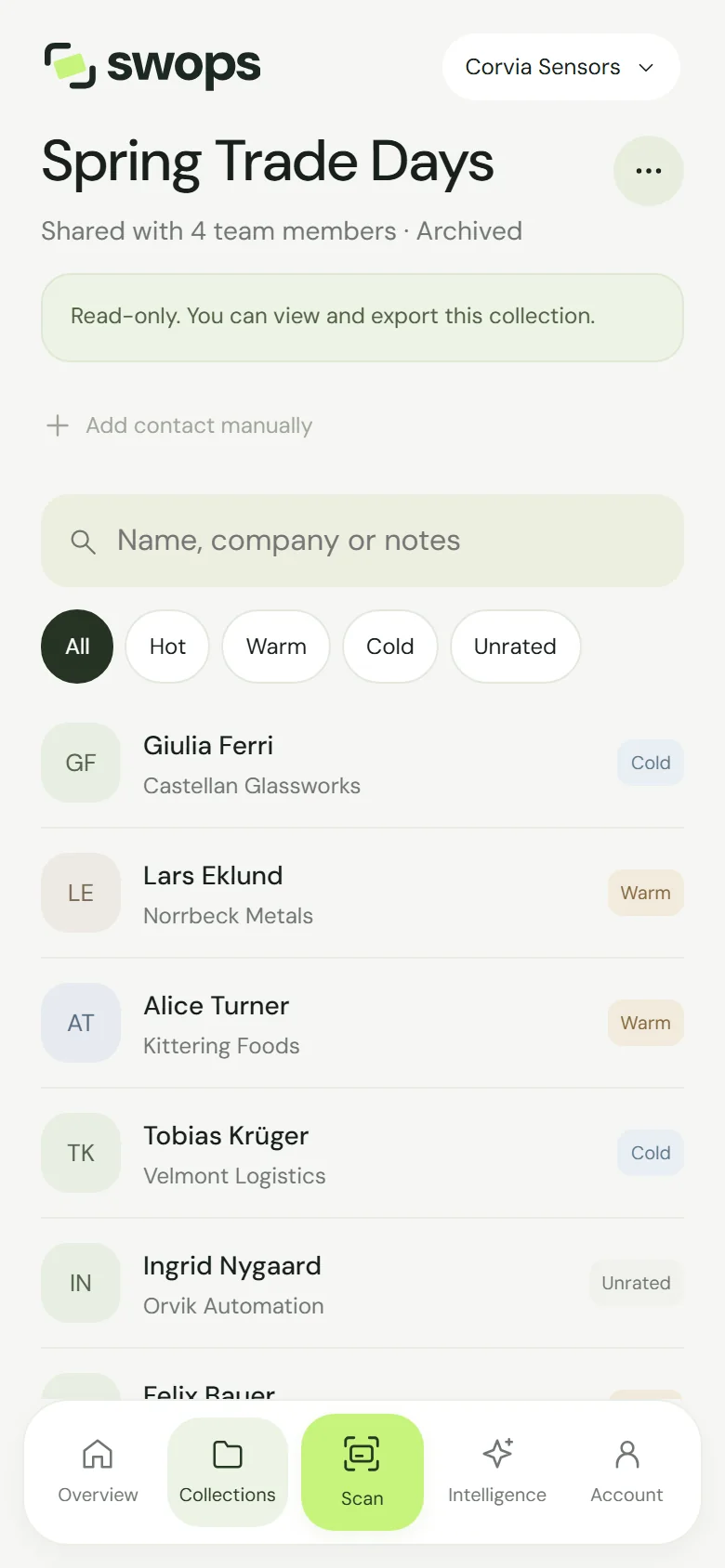
For those 30 days, everyone in the workspace can:
- view collections, contacts and notes,
- open saved briefs and attached card photos,
- export to CSV. See Export contacts to a CSV file.
Scanning, adding, editing or deleting contacts, new research and changes to company context wait for a plan. Trying shows a message that your access period has ended and that you can still view and export. Remaining allowance cannot be used, and top-ups do not extend the 30 days.
Coming back
- Solo or Business: choose a plan again within the 30 days. The workspace is active again at once, with all its collections.
- Team Pass: the owner taps Renew Team Pass. The workspace is active again at once, for 12 months from the renewal, with its collections and 3 new collection slots. See Renew a Team Pass.
- After deletion: nothing can be brought back. Your personal space can start again, empty, with Solo. A deleted company workspace is gone; create a new one for a new plan.
The emails
Swops emails the owner of the workspace. Members get none of these, so owners, tell your team. Dates in these emails are in London winter time (UTC), so they can be a day off from your local date.
| When | Subject | |
|---|---|---|
| Trial ending | From 3 days before the trial ends | “Your trial ends on (date). Keep going with Swops.” |
| Team Pass ending | From 14 days before the pass ends. Not sent once renewed | “Your Team Pass ends on (date). Keep the team together.” |
| Plan ended | When paid access ends. For a subscription that did not renew, a day later | “Your Swops plan has ended — (n) days to export” |
| Final reminder | From 7 days before deletion | “Your Swops collections will be deleted on (date)” (Team Pass: “Keep your Swops collections — renew by (date)”) |
The export links in these emails open Swops with the export ready to go.
When a renewal payment fails
Your workspace moves to Export only straight away while Link, which handles payments for Swops, retries the card. Update your card at app.link.com, or through the link in Link’s email if you received one, and full access comes back by itself as soon as a payment goes through. The 30-day export window counts from the end of your last paid period, so it is already running while Link retries. The “plan ended” email can arrive while the retries are still going on. See When a renewal payment fails.
What is deleted
At the end of the export window (or of the trial): the contacts and their notes, card photos, saved research, company context and the collections themselves, archived ones included, along with pending invitations and any remaining allowance. Purchase records stay, for accounting.
Deleted content cannot be restored, by you or by us. Backup copies are removed as backups are replaced. Export what you want to keep before the date.
Good to know
- Archiving never resets a date. An archived collection follows its workspace.
- Cancelling a subscription keeps full access to the end of the paid period. Until then, Keep subscription undoes it. See Cancel or resume a subscription.
- Top-ups and leftover allowance never extend how long your contacts are kept.
- Owners can delete a company workspace during the Export only period instead of waiting. See Delete a company workspace.